NotebookLM 2026 Review: The Best Private Research Copilot?
NotebookLM 2026 reviewed: source-grounded RAG, Gemini 3.5 Flash, Deep Research, Audio Overviews, pricing tiers, and who should actually use it.

Bytewaves Score Card
Most AI tools will confidently answer any question - and frequently get it wrong. NotebookLM takes the opposite approach: it only answers from documents you upload, cites the exact passage it drew from, and tells you when it doesn't know.
That constraint sounds limiting. In practice, for anyone doing serious research, it's the whole point.
Since its Google I/O 2026 overhaul - Gemini 3.5 Flash on the free tier, video overviews powered by Veo 3, and a complete pricing restructure - NotebookLM has moved well beyond the niche student tool it was two years ago. This review covers what actually changed, where the tool still falls short, and who should be using it.
TL;DR: NotebookLM is the best tool available for analyzing private document corpora. If you need verified, citation-backed synthesis from your own sources, nothing else matches it. If you need live web research or open-ended creative output, use Perplexity or Claude alongside it - not instead of it.
What NotebookLM actually does (and doesn't do)
NotebookLM is a RAG-based research assistant. You upload sources - PDFs, Google Docs, YouTube transcripts, audio files, web pages, images, or CSVs - and Gemini reasons over that specific corpus to answer your questions. It does not draw on the open web or its training data by default. Every answer links back to the exact passage in your source material.
The practical consequence: the AI cannot fabricate facts that aren't in your documents. If you ask something your sources don't cover, it says so.
That's the full value proposition. For researchers, lawyers, pharma professionals, and anyone handling sensitive documents, this is not a minor feature - it's the architecture they've been waiting for.
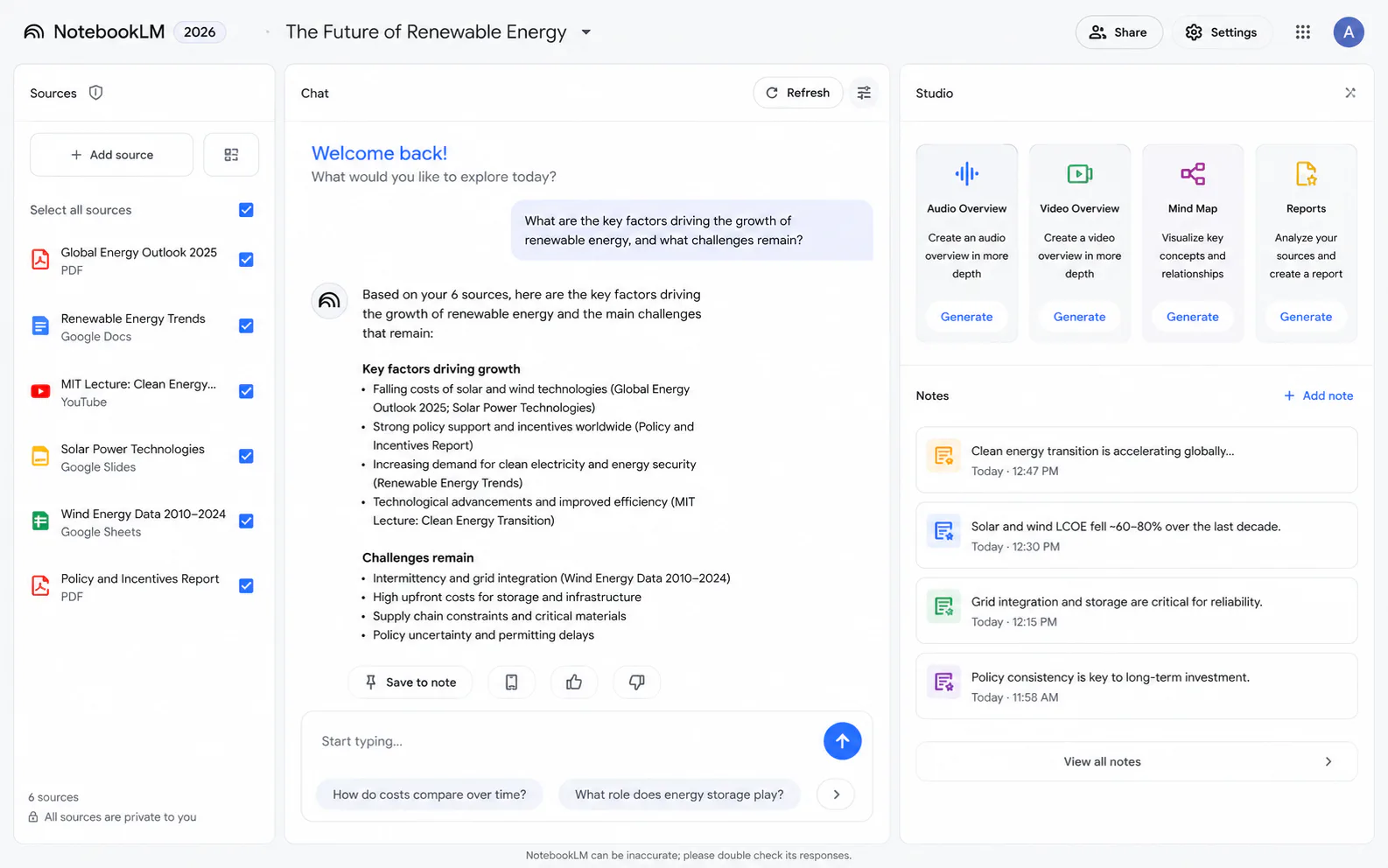
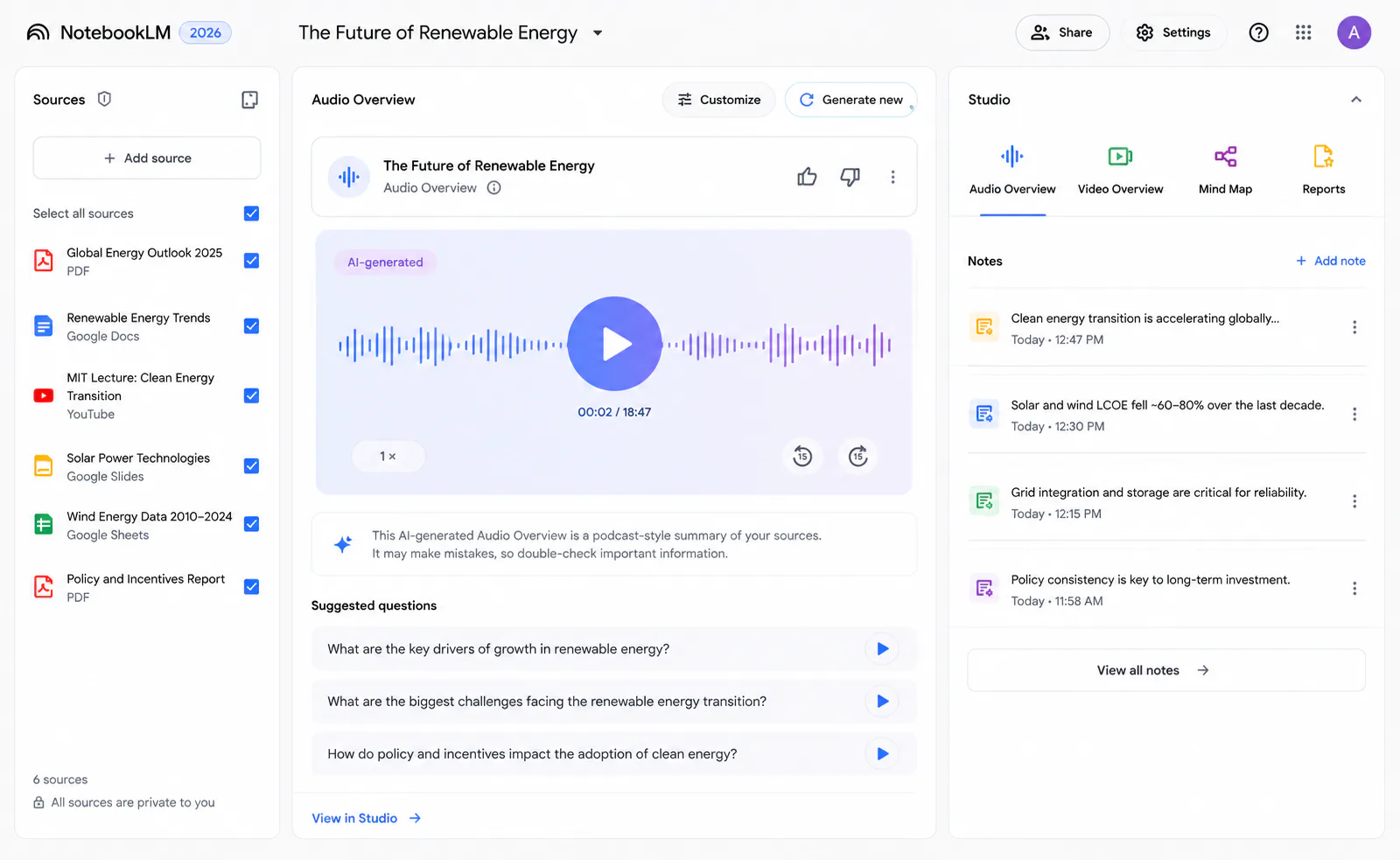
The 2026 interface organizes everything into three panels:
- Sources (left): upload, manage, and search your document collection
- Chat (center): query your corpus in plain language with cited responses
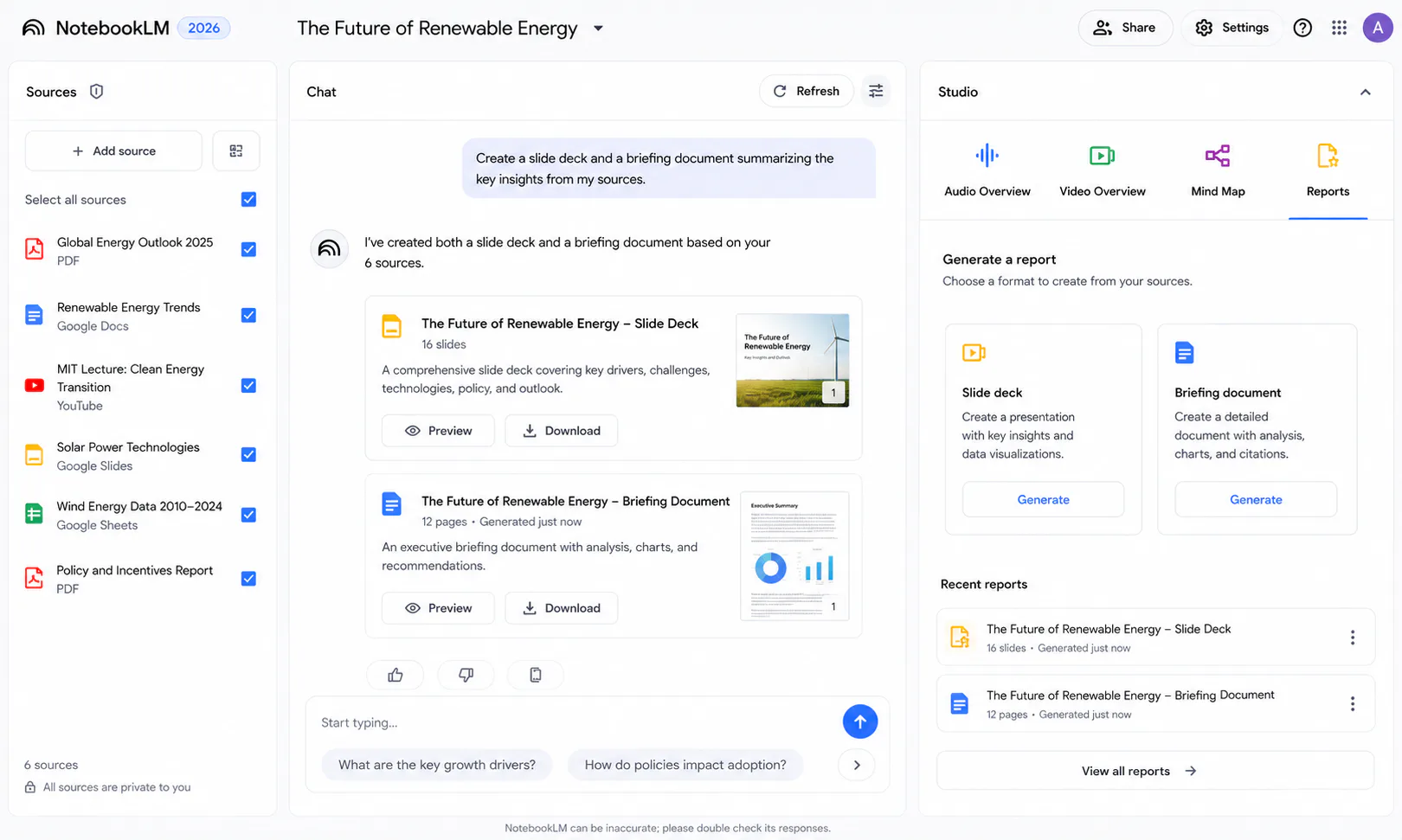
- Studio (right): generate deliverables - briefing docs, slide decks, audio overviews, infographics, quizzes
The Studio panel is where NotebookLM separates itself from simple RAG wrappers. Most tools let you ask questions; NotebookLM turns answers into formatted outputs you can actually ship.
The 2026 feature set worth knowing
Gemini 3.5 Flash and the 1M token context window
As of Google I/O 2026, the free tier runs on Gemini 3.5 Flash, bringing meaningfully faster multi-step reasoning and better handling of complex, cross-document queries. The context window sits at 1 million tokens - enough to process entire legal filings, academic corpora, or product manuals in a single session.
For practical reference: 1 million tokens covers roughly 750,000 words, or about 1,500 typical research papers in one session. You're unlikely to hit the context limit before hitting the source cap (50 sources on the free tier).
Deep Research: agentic web access without abandoning privacy
The November 2025 Deep Research feature changes the closed-corpus calculus significantly. When you trigger a Deep Research run, NotebookLM searches the web, compiles a structured citation-backed report, and adds it to your notebook as a new source - which you then query like any other document.
This matters because it dissolves the binary between "private corpus" and "live web." You can now research public information and analyze it alongside your private documents in the same session, with full citation transparency on both sides.
The free tier includes 10 Deep Research runs per month. The Pro tier ($19.99/month) raises that to daily professional use.
Audio and Video Overviews
Audio Overviews remain NotebookLM's most distinctive feature. Upload any set of sources; the system generates a podcast-style conversation between two AI hosts who synthesize, discuss, and contextualize your material. No competitor replicates this with comparable quality.
The 2026 addition is Cinematic Video Overviews, powered by Veo 3: short visual summaries of notebook content. Whether you need this depends on your workflow, but as a way to quickly communicate research findings to stakeholders who won't read a 40-page document, the use case is real.
One limitation: Audio Overviews can truncate very long documents, producing summaries that miss material in the latter portions of large sources. It's a known constraint; for comprehensive coverage, supplement with direct Chat queries.
Studio deliverables: from research to output in one step
The Studio panel generates: briefing documents, study guides, FAQs, timelines, infographics, slide decks (editable since February 2026 - you can now target specific slides rather than regenerating the whole deck), quizzes, and flashcards.
The Data Tables Studio feature deserves special mention. Upload a set of documents, ask NotebookLM to extract structured data, and export directly to Google Sheets. One documented use case: mapping 71 pages of ERC guidelines and 188 pages of EIC work programmes into a structured funding overview - that's the kind of task that would take a researcher days to do manually.
Privacy architecture: what Google actually guarantees
This is the part most reviews gloss over, so let's be specific.
Google does not use your uploaded content to train its models. Sources are encrypted in transit and at rest. The free and paid consumer tiers provide these guarantees. The enterprise Google Cloud tier adds VPC-SC compliance, IAM role-based access, and full audit trails.
What Google does not guarantee: cryptographic scrubbing of deleted files. For organizations handling PHI, attorney-client materials, or regulated financial data, the consumer tier's policy promises are not sufficient. You need the enterprise tier - and you should have your legal counsel review the specific data processing addendum for your jurisdiction before uploading anything genuinely sensitive.
For most researchers working with published materials, corporate strategy documents, or non-personal internal content, the standard privacy guarantees are solid.
Pricing: generous free tier, awkward paid structure
Verify current limits on Google's NotebookLM product page and Google AI plan pricing before budgeting - tiers and bundles change after I/O announcements.
| Tier | Price | Key limits |
|---|---|---|
| Standard (Free) | $0 | 100 notebooks, 50 sources/notebook, 50 daily chats, 10 Deep Research/month |
| Plus (Google AI Plus) | $7.99/mo | ~2× all free limits, 3 Deep Research/day |
| Pro (Google AI Pro) | $19.99/mo | Power user tier, daily professional use |
| Pro Student | $9.99/mo | US students 18+, same as Pro |
| Ultra (Entry) | $99.99/mo | 2,500 daily chats, 500 sources/notebook |
| Ultra (Max) | $200/mo | 5,000 daily chats, 600 sources/notebook |
| Workspace Business | ~$14/user/mo | Team sharing, IAM roles |
| Enterprise (Google Cloud) | ~$9/license/mo | Full data governance, VPC-SC, audit trails |
The most important thing about this table: NotebookLM cannot be purchased as a standalone product. Paid tiers are bundled with Google AI subscriptions that include Gemini access, cloud storage, and other services. If you're already paying for Google One or Google Workspace, the incremental cost of NotebookLM's paid features is low. If you're not in the Google ecosystem, you're paying for more than you might need.
The free tier is genuinely useful. All core features - including Deep Research, Audio Overviews, Video Overviews, the 1M token context window, and the full Studio panel - are available on the free tier. For most individual researchers, the free tier is sufficient.
Where NotebookLM still falls short
Isolated notebooks. This is the most consistent complaint from power users: notebooks cannot share context with each other. If you're managing multiple ongoing projects - say, competitive intelligence, a client matter, and an internal research initiative - you cannot query across all three simultaneously. Each notebook is a silo.
Source caps in practice. 50 sources on the free tier sounds generous until you're doing a literature review on a topic with 200 relevant papers. The paid tiers raise the limit significantly (up to 600 at Ultra Max), but researchers working at scale will still feel the friction.
No real collaboration. Unlike Notion AI or Atlas Workspace, NotebookLM does not support simultaneous multi-user editing within a notebook. Teams share notebooks asynchronously at best - a meaningful gap for collaborative research environments.
Technical formatting gaps. There is no native support for Markdown export, LaTeX equations, or code blocks. For technical researchers, software engineers, or academics working with mathematical notation, this is not a minor inconvenience.
Limited integrations outside Google. If your workflow runs through Slack, Notion, Linear, or any non-Google tool, NotebookLM has nothing to offer. Deep integration with Google Workspace is a genuine advantage for Google-native organizations and a genuine limitation for everyone else.
The echo-chamber risk. NotebookLM analyzes what you give it. If your sources are biased or incomplete, the AI's synthesis reflects that without challenge. Google added a "Critique" mode in response to this feedback, but the fundamental dynamic remains: garbage in, confident-sounding garbage out.
How it compares to the main alternatives
The honest answer about competitive positioning is that the best researchers in 2026 are using NotebookLM as part of a tool stack, not as a single solution.
| Dimension | NotebookLM | Perplexity Spaces | Claude Projects |
|---|---|---|---|
| Source model | Your uploads only (+ Deep Research) | Live web + uploads | Documents + persistent notes |
| Hallucination risk | Low | Moderate | Low-moderate |
| Privacy | Strong | Lower | Strong |
| Audio/Video Overviews | ✓ | ✗ | ✗ |
| One-click deliverables | ✓ | ✗ | ✗ |
| Real-time collaboration | ✗ | ✗ | ✗ |
| Google Workspace integration | ✓ | ✗ | ✗ |
| Best for | Private document analysis | Live, fast-moving topics | Deep reasoning, mixed sources |
NotebookLM vs Perplexity Spaces: Perplexity wins for real-time topics where currency matters. NotebookLM wins when the corpus is defined and source fidelity is non-negotiable.
NotebookLM vs Claude Projects: Claude Projects offer deeper reasoning and handle mixed document-and-note sources well. NotebookLM's Audio/Video Overviews, one-click deliverable generation, and Google Workspace integration are genuinely absent from Claude. They solve adjacent problems - it's not uncommon to use both. See our overview of AI research tools for a broader comparison.
NotebookLM vs Elicit: Elicit is purpose-built for academic systematic reviews. It handles 50–200 papers more rigorously for formal academic workflows. NotebookLM is more versatile across document types. If you're writing a systematic review for publication, use Elicit.
For how frontier models are shifting away from open weights - relevant if you chose NotebookLM partly for Google's stack - see our Muse Spark launch breakdown.
Who should use NotebookLM
Use it if:
- You regularly analyze proprietary documents and need verifiable, citation-backed outputs - legal professionals, pharma teams, strategy consultants, compliance officers
- You're a student or researcher who wants exam or study material that is strictly tied to your actual sources (not the model's general knowledge)
- You're producing knowledge-intensive content - YouTube research, blog post research, podcast prep - and want to move from source corpus to structured output quickly
- Your organization runs on Google Workspace and you want AI that fits natively into your existing document workflow
- You need to communicate research findings to stakeholders who won't read the raw documents - Audio and Video Overviews are a genuine time-saver here
Skip it if (or use it alongside something else):
- Your work requires live, real-time information - Perplexity handles that better
- You need true air-gap privacy where no data leaves your device - Obsidian with local AI plugins is the right architecture
- Your core workflow is creative ideation or open-ended drafting - Claude or ChatGPT will serve you better
- You're doing formal academic systematic reviews - Elicit is purpose-built for that workflow
- Your team needs real-time collaborative editing on the same notebook
Verdict
NotebookLM earns its reputation as the best private research copilot available because it solves a specific, well-defined problem better than anything else: turn a defined document corpus into verified, cited analysis and presentation-ready deliverables without introducing facts your sources don't contain.
The 2026 updates - Gemini 3.5 Flash on the free tier, Deep Research, Video Overviews, targeted slide editing, and the Data Tables Studio - close gaps that were real limitations twelve months ago. The free tier remains genuinely capable; most individual researchers won't need to pay.
The remaining constraints are real: no cross-notebook context, limited export options, no live collaboration, and weak support for technical formatting. If those gaps are blockers for your workflow, they won't be fixed by upgrading your plan - they're architectural.
The right frame isn't "NotebookLM vs. ChatGPT." It's "where does source-grounded analysis fit in my research stack?" For anyone who regularly synthesizes documents they own or control, the answer to that question is increasingly obvious.
Frequently asked questions
Yes. The free tier includes 100 notebooks, 50 sources per notebook, 50 daily chats, 10 Deep Research runs per month, and access to all core features including Audio Overviews, Video Overviews, and the 1-million-token context window. Most individual researchers won't need to upgrade. Paid tiers start at $7.99/month as part of Google AI Plus.
Google explicitly states that uploaded sources are not used to train NotebookLM's models. Data is encrypted in transit and at rest. For organizations handling regulated data (PHI, legal client files, financial records), the standard consumer tier's policy guarantees are not sufficient - you need the Enterprise tier via Google Cloud, which adds VPC-SC compliance, IAM controls, and audit trails.
They solve different problems. NotebookLM is better when you have a defined document corpus and need verifiable, citation-backed synthesis from your own sources. Perplexity is better for live web research where currency and breadth matter more than source fidelity. Many researchers use both: Perplexity for discovery, NotebookLM for deep analysis.
NotebookLM currently ingests PDFs, Google Docs, Google Sheets, Google Slides, YouTube transcripts, audio files, web pages, images (with OCR), and CSV files. EPUBs and ZIP archives are not supported. Google Docs and Sheets are treated as "living documents" that can sync updates in real time.